Dash Alarms
Your Rush SR’s AiM dash comes pre-configured with the alarms and icons listed below. To update your configuration, pick a release from the AiM Config Releases page and import it into RaceStudio 3. Check the release date against any alarm note below rather than assuming the newest one is the one you want.
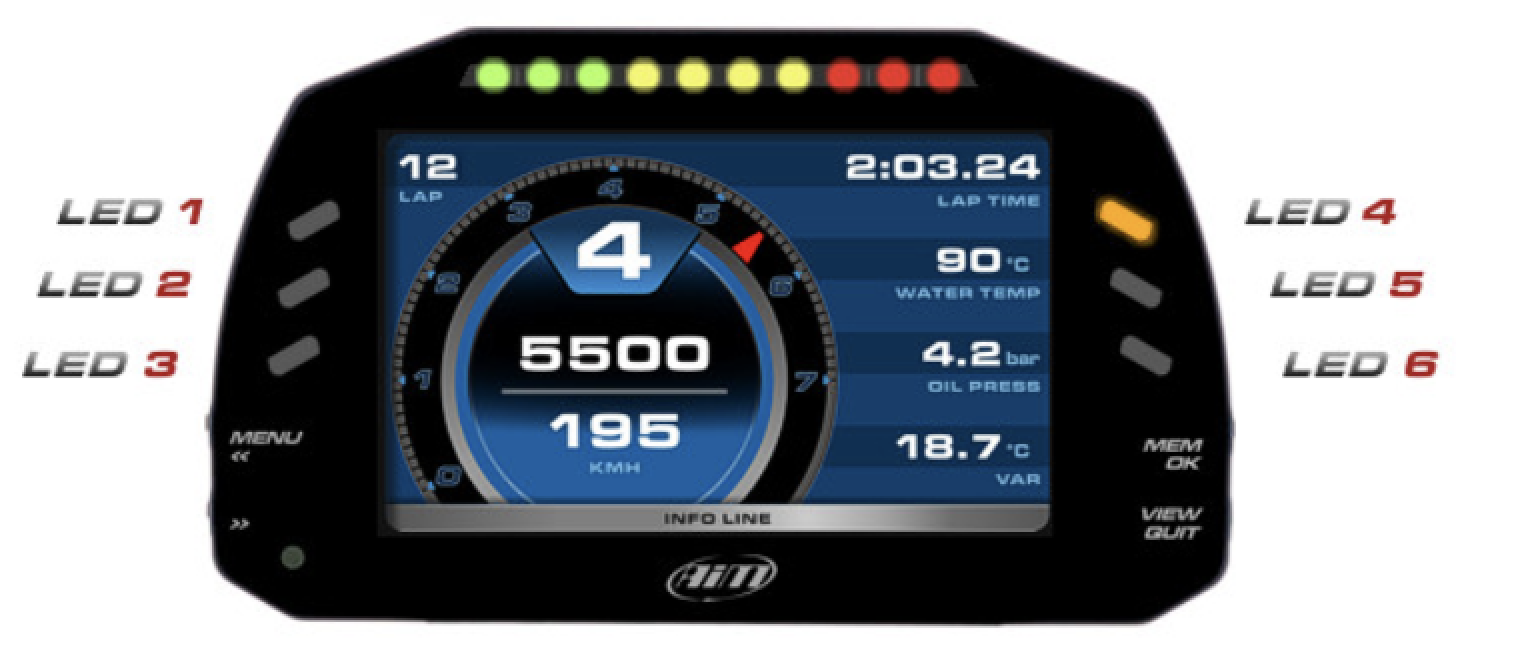
Text & LED Alarms
Section titled “Text & LED Alarms”These alarms display a text message on screen and/or blink the dash LEDs when triggered.
Oil Pressure
Section titled “Oil Pressure”- Low Oil Pressure (Oil Pressure < 5 psi): LED 4 blinks orange and message “Low Oil Pressure” is displayed. Come in immediately.
- High Oil Pressure (Oil Pressure > 90 psi): LED 6 blinks blue and message “High Oil Pressure” is displayed. This may just indicate cold oil — monitor the situation.
- Very High Oil Pressure (Oil Pressure > 120 psi): LED 6 blinks fast red and message “Very High Oil Press” is displayed. This message will not be dismissed until the car is turned off. Come in and check the pressure relief valve.
Water Temperature
Section titled “Water Temperature”- High Water Temp (Water Temp > 230°F): LED 5 blinks orange and message “High Water Temp” is displayed. Reduce pace and come in soon.
- Very High Water Temp (Water Temp > 238°F): LED 5 blinks fast red and message “Very High Water Temp” is displayed. This message will not be dismissed until the car is turned off. Come in immediately.
Once you are in, let the engine idle to cool down before you shut it off. Killing a hot engine leaves the heat in it with no coolant moving.
Then watch the temperature fall. If it does not come down (may be at a reduced pace), or if it climbs again after you top the radiator up, coolant is being lost or air is being drawn in. See After an overheat.
Oil System Health (RPM-Based)
Section titled “Oil System Health (RPM-Based)”These alarms use the OilP RPM Ratio channel, which compares oil pressure against what’s expected for the current engine RPM. Since oil pressure naturally scales with RPM, a raw PSI reading alone doesn’t tell the full story — 12 psi at idle is normal, but 12 psi at 8000 RPM would be dangerously low. The ratio channel normalizes this so values above 100% are healthy and values below trigger alarms.
Typical values: 500–700% on a cold start, ~200% heading out for an outlap, 100–150% at operating temperature under load.
- Check Oil Fill (OilP RPM Ratio drops during hard cornering): LED 6 lights solid yellow. Oil level is low enough that lateral g-forces are starving the oil pickup. Adding approximately 0.25L of oil generally fixes this. The alarm requires sustained lateral acceleration above 1g combined with low oil pressure ratio, so brief dips during transitions won’t trigger it.
- Check Oil Pump (OilP RPM Ratio continuously below 80%): LED 6 lights solid yellow. Oil pressure is consistently low relative to RPM, suggesting a possible oil pump issue. Come in and inspect the oil system.
- Low OilP (OilP RPM Ratio below 45%): LED 6 blinks fast red. Oil pressure is critically low for the current RPM. Come in immediately.
- OilP Sender Failed (Oil Pressure reading out of range): LED 6 lights solid magenta. The oil pressure sensor appears to be producing bad data (e.g., reading negative pressure). Check the sensor wiring and connections. While this alarm is active, the oil system health alarms above are suppressed to avoid false alerts.
Clutch Switch
Section titled “Clutch Switch”- Check Clutch Switch (clutch reads disengaged while the car accelerates on throttle): LED 1 lights solid magenta and message “Check Clutch Switch” is displayed. It fires when all three hold for 3 seconds: the switch reads the clutch as disengaged, the car is accelerating at more than 0.15 g, and the throttle is above 40%. A car can’t pull like that with the clutch disengaged, so something is grounding the clutch wire: the switch is stuck closed, or the wire is shorted to the chassis. A jumper or permanent ground in place of a switch raises it too. A disconnected switch reads as clutch engaged and never raises this alarm. Holding the clutch in on pit lane, in qualifying or behind the safety car doesn’t trigger it. Configs dated before 31 August 2026 use an older speed-based check that does; see the false alarm below.
Check the switch, then check your config version. Both can raise this alarm and they call for opposite responses, so do them in that order: a genuinely stuck switch lets the starter crank with the car in gear, which is worth ruling out before concluding the dash is crying wolf.
Bring the car in at the end of the session. While the alarm is up, start the engine in neutral. On a car with a switch fitted, the car reads the clutch as disengaged whether or not you’re on the pedal, so the starter will crank in gear. On a Gen2 drive-by-wire car a genuinely faulty switch also shows up on track as limp mode with no throttle blip on downshift, which a spurious alarm does not.
The false alarm. Configs published before 31 August 2026 raise this during normal driving. The alarm keys on the clutch reading disengaged at speed under throttle, and never asks whether the car is actually accelerating, so it cannot tell a lying switch from a driver using the clutch. A long shift, feathering the clutch, or a slow hairpin entry can trip it on a healthy car. Exact thresholds differ between config versions, so treat that as the shape of the fault rather than a spec to measure against.
The corrected alarm ships in a release dated 31 August 2026 or later. Check the date on the AiM Config Releases page rather than taking whatever is newest, because an earlier release carries the old condition. No such release exists yet, so for now the switch checks above are the only way to tell the two apart.
Once a dated release is available, two ways to take it:
- Download the matching
.zconf2and import it in RaceStudio 3 under Configurations → Import. This replaces your config. - If you run your own custom config and want to keep your settings, use the AiM Config Merge Tool on rushautoworks.com instead.
This alarm only exists on drive-by-wire configs. A Gen1 KLine car has no clutch input in its config at all, so if you see it, you are on a drive-by-wire car.
Once you’re back in the paddock, see:
- Clutch Switch (Gen2 DBW) for diagnosing a failed or misadjusted switch on a drive-by-wire car, including the broken neutral switch that presents the same way.
- Diagnosing a Faulty Clutch Switch for the switch itself. To find its wire, jump straight to Gen2 (drive-by-wire) or Gen1 (drive-by-cable / KLine). Where the Switch Is tells you where to look on the car, and Wiring and Mounting the Switch has the mounting position and the adjustment check.
- An oil pressure warning icon is shown at low pressures (<10 psi) and high pressures (above 90 psi; dismisses below 60 psi).
- A blue oil pressure icon is shown between 45–60 psi, indicating that the engine is cold.
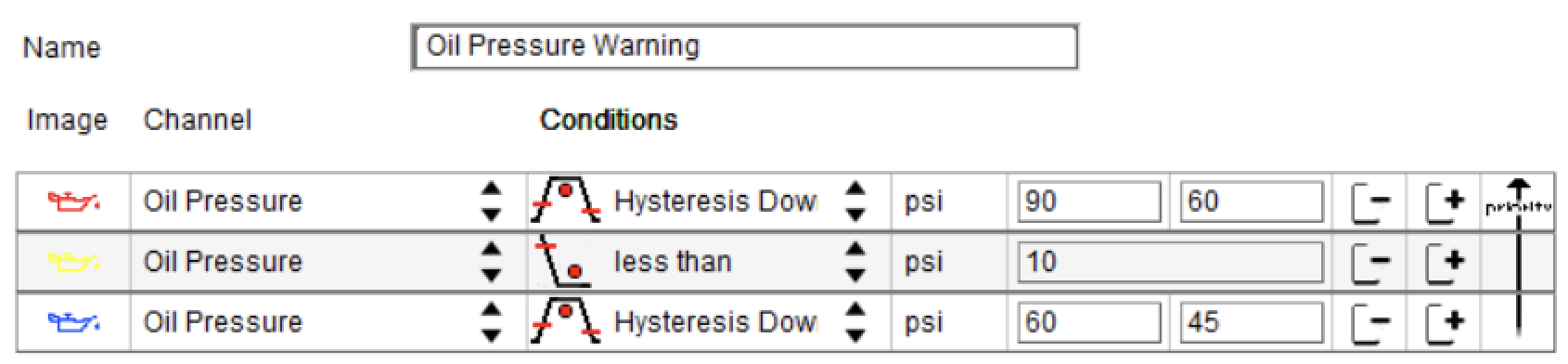
Oil Pressure Warning icon configuration in RS3
- A red water temp icon is shown above 230°F, indicating that there may be a problem with the thermostat or air in the lines. Consider shutting off the engine ASAP.
- A blue water temp icon is shown below 160°F, indicating that the engine is cold.

Water Temperature Warning icon configuration in RS3
Maintenance Intervals
Section titled “Maintenance Intervals”- A blue oil change icon will be shown at the bottom right of the dash every 640 mi (approx 8 hours). After changing the oil, reset Usr 3.
- A blue motor refresh icon will be shown at the bottom right of the dash every 12,000 mi (approx 150 hours). After refreshing the motor and gearbox, reset Usr 4.
- The process for viewing and resetting User Counters is below:
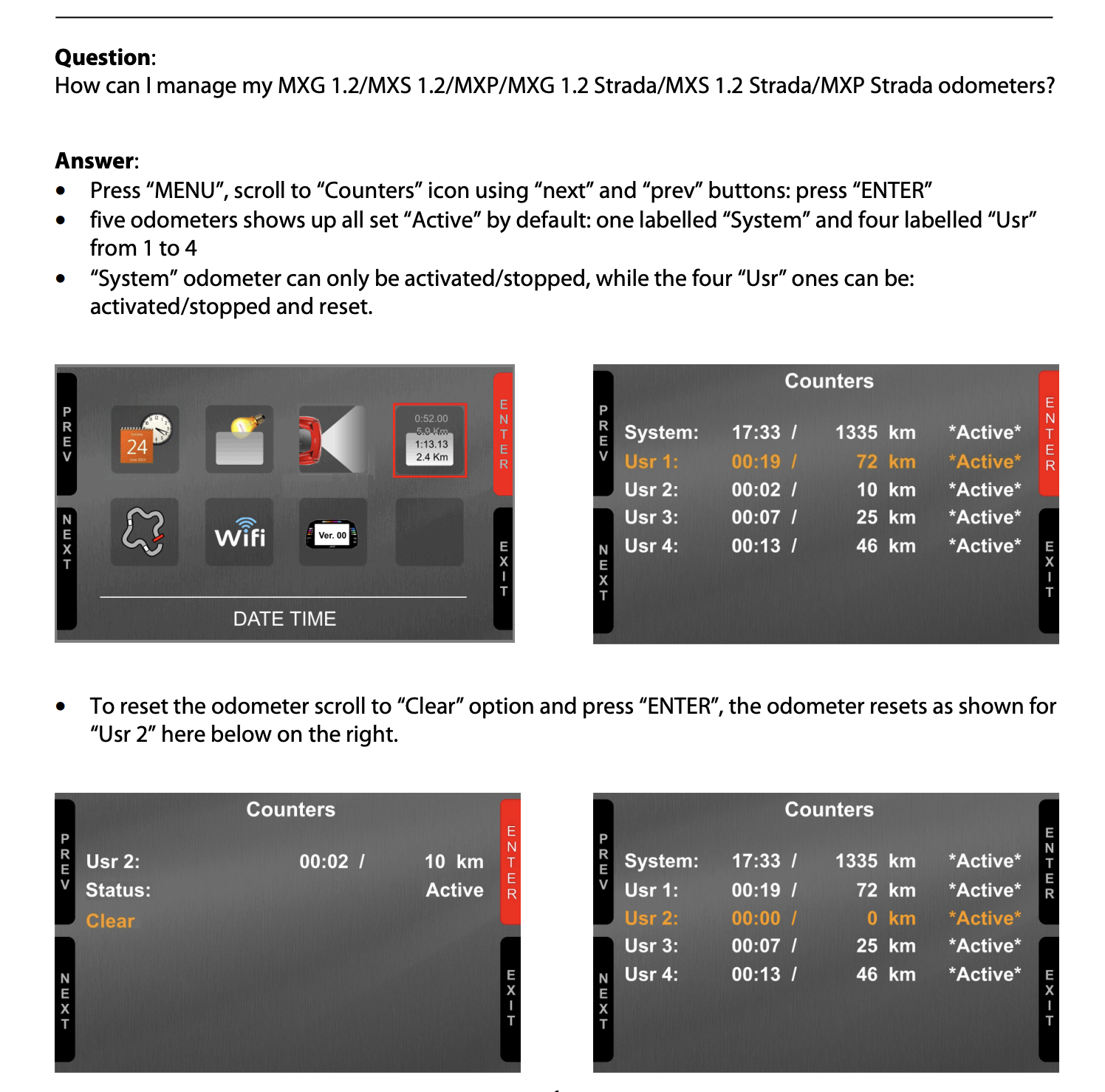
AiM Documentation for User Counters / Odometers. Note they are specified in km.